
Check aesthetic phone cases by matching the case’s selected model option to the exact model name in your phone’s settings, then checking the camera opening, buttons, and charging-port access. Screen size and a similar-looking product photo do not establish compatibility. Before ordering in 2026, confirm that the cart still shows the correct phone-model option—not just your preferred design.
- Choose aesthetic phone cases by exact phone model first; compare minimalist designs or NYC-inspired graphics afterward.
- Camera openings, button placement, and charging-port access matter more than a matching screen size.
- Lux & Lounge suits NYC-inspired personal style; verify each phone case’s selected model before ordering.
- For gifts, confirm the recipient’s full phone model before choosing the design.
How do you check if an aesthetic phone case fits your phone?
Match the complete phone model, check the selected case variant, and inspect the openings. Treat these as separate checks. A listing can show the design you want while its selector is set to a different device.
The aesthetic phone cases buying guide covers choosing a design. Use the steps below to establish fit before making that style decision.
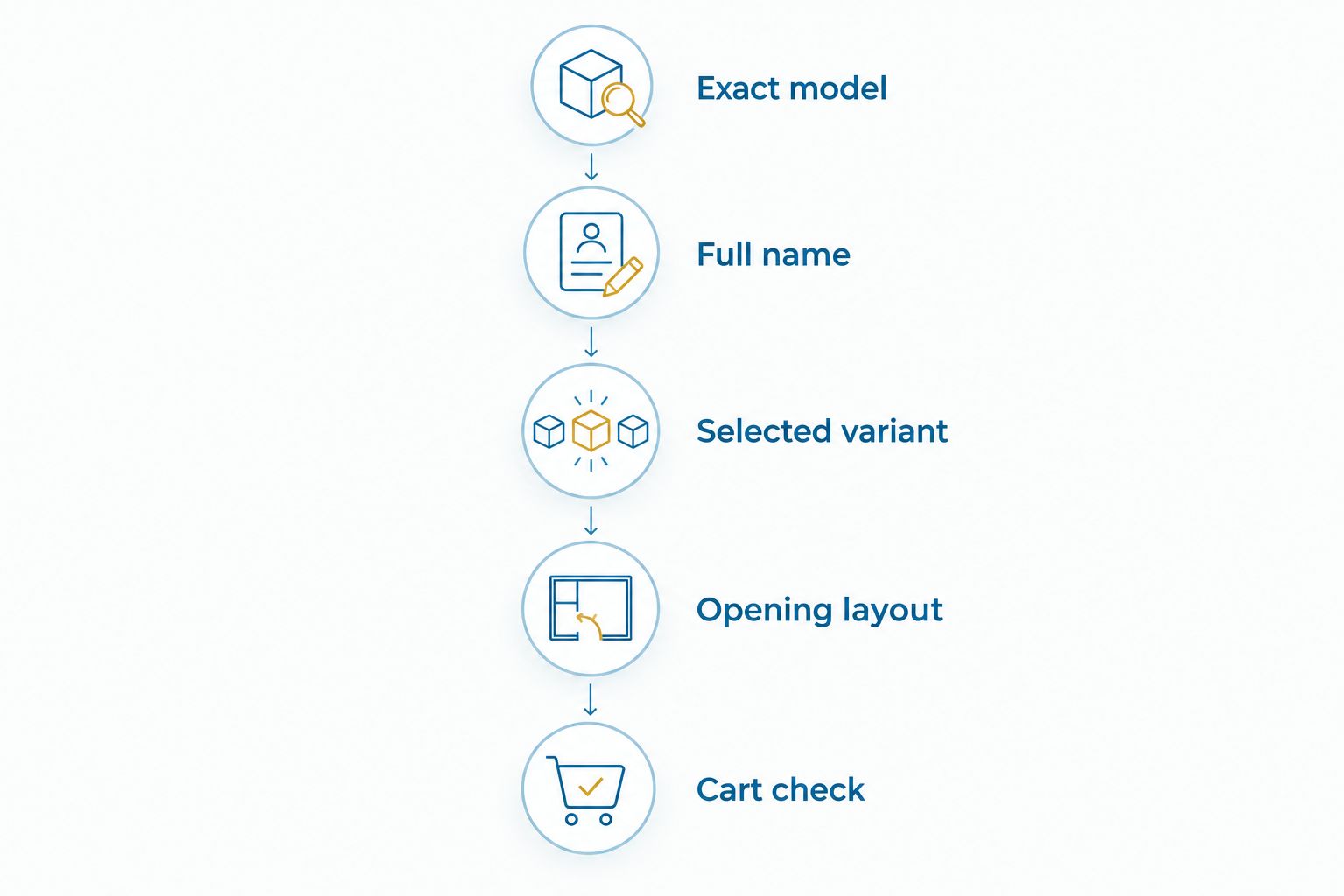
1. Exact model: read your phone’s settings
On an iPhone, open Settings, then General, then About, and read the Model Name. On Android, look for About phone in Settings; the menu wording varies by manufacturer and software version.
Record the full name rather than shortening it to a brand or product family. Include every model suffix shown. A standard model and a larger or differently equipped version are not interchangeable simply because their names share the same beginning.
Do not rely on the name you gave your device. A personalized device name identifies your phone to you, but it does not establish which case fits it. Use the manufacturer’s model information instead.
2. Full name: match the listing’s compatibility wording
Find the compatibility information on the case listing and compare it with your recorded model name. Every part of the model designation must match. A broad phrase such as an iPhone case identifies a category, not a complete compatibility specification.
Read the model selector as well as the description. If the listing groups several phones together, establish which option applies to your device before choosing it. When the wording leaves the model unclear, ask for confirmation rather than treating a similar name as a match.
Keep style language separate from fit information. Minimalist, dark aesthetic, motivational, and NYC-inspired describe the design direction. None tells you where the camera opening or side buttons belong.
3. Selected variant: check what you are actually ordering
Choose the phone-model option deliberately, even when the displayed image already looks right. A product page can present several model options under one design, so the main image alone is not your order specification.
After choosing the design and model, read the selected option again. Check it after changing any other available selection, too. Your final choice should retain the exact device name you recorded from Settings.
For a 2026 purchase, inspect the current listing rather than relying on an old saved screenshot. Your saved image records what you previously viewed; the current selection determines what you are about to order.
4. Opening layout: compare the physical details
Look at the camera opening, flash clearance, side-button positions, and bottom openings in any model-specific images provided. Compare their placement with your actual phone, not with another phone pictured nearby.
Use this inspection to catch an obvious mismatch. A camera opening in the wrong position or a button cover that does not correspond to your device is a reason to stop and recheck the model selection.
Photos support an exact-model match; they do not replace it. Perspective, image cropping, and a representative product photo make visual comparison less dependable than an explicit compatibility designation.
5. Cart check: confirm the model before checkout
Open the cart and read the item’s selected options. The design name alone is not enough. Confirm that the phone-model option matches your device and that you have not carried over an earlier selection.
If the cart does not display the model clearly, return to the listing and confirm the selection before proceeding. Keep the model information with your order confirmation so you can compare it with the item you receive.
This final check is especially useful when buying several cases or shopping for someone else. Keep each recipient’s model tied to their chosen design rather than relying on memory.
Why this matters
A phone case is both a visible style choice and an object that must line up with a specific device. The design can suit you perfectly while the selected version does not fit your phone.
In 2026, use the same buying order regardless of the aesthetic: compatibility first, design second, final selection last. This keeps a bold graphic or polished product image from distracting you from the practical decision.
Fit also differs from protection. A case that attaches correctly has passed a fit check; that observation alone does not establish drop protection, material quality, or accessory compatibility. Evaluate those claims separately when the listing provides supporting information.
Which compatibility checks should you trust?
Use the full model designation as your starting point, then use images and a physical inspection as supporting checks. Each method answers a different question.
| Check | Best for | What it establishes | Limitation |
|---|---|---|---|
| Exact model in Settings | Identifying your device | The model you need to match | Does not identify the selected case variant |
| Listing and model selector | Choosing the intended case version | The device named for that option | Unclear wording still needs clarification |
| Model-specific product images | Spotting obvious layout mismatches | Visible camera and opening placement | A photo alone cannot confirm fit |
| Cart’s selected options | Catching an ordering mismatch | The version included in your order | Does not physically test the case |
| Gentle physical inspection | Checking the received case | Alignment and access on your phone | Does not prove protection performance |
Use these checks together, not as substitutes. Knowing your device is essential, but you still need to choose the matching case option. Likewise, a correct-looking camera opening does not excuse a mismatched model name.
Why phone-case fit varies
Phone-case fit depends on the device’s physical layout, not on whether two designs look alike. Check these areas rather than reducing compatibility to a single measurement:
- Body dimensions: The case must correspond to the phone’s overall shape, not just the display measurement.
- Camera layout: The opening must leave the lenses and flash unobstructed.
- Button placement: Covers or openings must line up with the controls you use.
- Charging-port access: The opening must allow your charging connector to seat without obstruction.
- Speaker and microphone openings: Check that the case does not cover the relevant openings.
- Model designation: The complete model name connects these physical details to the option you order.
Similar screen sizes do not establish identical bodies. Nor does a shared product-family name establish identical camera layouts. Avoid shortcuts that turn a model-specific purchase into a visual guess.
These checks remain useful when a listing offers several aesthetic phone cases with the same artwork. The artwork is the shared design; the selected model determines the intended fit.
How do you check the case after it arrives?
Before fitting the case, compare the received item and any model identification with your order. Check the instructions supplied with it, and inspect the case for visible damage or anything inside that would prevent a clean fit.
Fit it according to those instructions. Do not force a case onto a phone when the shape or openings do not align. Unexpected resistance is a reason to stop and verify the item, not to press harder.
Once fitted, inspect the corners and edges. Look for a corner that remains unseated, a side that pulls away, or a case edge that interferes with normal use. Check that the camera lenses and flash remain clear.
Test the side controls gently and confirm that your charging connector seats normally. Inspect speaker and microphone access as well. If an opening is blocked or a control is being pressed unintentionally, remove the case according to its instructions and recheck the model.
A successful fit check is specific: the case seats correctly and leaves the phone’s controls and openings usable. It is not a substitute for separately documented protection claims.
Can you check compatibility when buying a phone case as a gift?
Yes—ask the recipient for the complete model name from their phone’s settings. A screenshot of the relevant model information is more useful than a photo of the phone’s back or a description such as the larger version.
If you want to preserve the surprise, separate the practical question from the design choice. Confirm the device first, then choose artwork that reflects the recipient’s preferences. Do not assume that someone who likes New York wants every NYC-themed graphic.
For a 2026 gift, also confirm which phone the recipient currently uses. A previously discussed device is not a reliable basis for choosing a case if they have since changed phones.
When you cannot verify the model, choose a gift that does not depend on phone compatibility. An exact-fit accessory needs exact information. Personal style matters, but it cannot resolve an unknown device model.
Choose the aesthetic after confirming the fit
Start with what you want to see every day: a restrained composition, darker graphics, or a statement tied to a place or mindset. Use your existing accessories and the recipient’s stated preferences as references rather than assuming a particular age, gender, or location.
Lux & Lounge phone cases are best for shoppers choosing NYC-inspired personal style, with exact-model compatibility checked separately. The Me vs Me™ iPhone Case | NYC Motivational Phone Case is a relevant design reference for someone drawn to a motivational NYC theme; its title is not a complete model-compatibility list.
Treat Lux & Lounge’s design language as the style decision, not the fit evidence. Check the current model options before selecting a case. A distinctive design belongs on your shortlist only when the matching phone option is clearly identified.
Does the same screen size mean a phone case will fit?
The same screen size does not confirm phone-case compatibility. Display size does not describe the complete body, camera arrangement, or control placement that a case must accommodate.
Use the exact model designation instead. Treat any measurement or visual similarity as supporting information, never as permission to substitute one model’s case for another.
Can you use a case made for a different phone generation?
Use a different generation’s case only when its compatibility information explicitly includes your exact phone model. Shared branding or a similar silhouette does not establish that the case’s openings and shape match.
For 2026 shopping, read the current compatibility wording and selected option. Do not carry an assumption from a previous phone into a new case purchase.
FAQ
How do I know which aesthetic phone cases fit my phone?
Match the complete model name in your phone’s settings to the case listing and selected model option. Then check camera placement, button alignment, and charging-port access.
Where do I find my exact phone model?
On an iPhone, open Settings, General, then About and read Model Name. On Android, look for About phone in Settings; menu wording varies by manufacturer and software version.
Is a matching screen size enough to choose a case?
No, a matching screen size does not establish phone-case compatibility. The phone’s body shape, camera layout, and controls also need to match the case.
Can I choose a phone case from the product photo alone?
No, a product photo alone cannot confirm the selected case’s compatibility. Use the explicit model information first, then inspect model-specific images for obvious mismatches.
How do I choose a phone case as a surprise gift?
Confirm the recipient’s complete phone model before choosing the design. If you cannot verify it, choose a gift that does not depend on phone-model compatibility.
How do I check a Lux & Lounge phone case before ordering?
Check the case listing’s current compatibility information and select the option matching your exact phone model. Confirm that the cart retains that model selection before checkout.
Does a case that fits automatically provide drop protection?
No, correct fit does not establish drop protection. Evaluate protection claims separately using the product information supplied for that case.
One last thing
The easiest mismatch to overlook is the selected option, not the design. You can identify your phone correctly, find the right listing, and still leave a different model selected when you add the case to your cart.
Make your final read a model check. Compare the cart’s option with the full name recorded from your phone’s settings, then confirm the design. That small change in buying order keeps personal style and practical fit aligned without relying on a product photo.